Let’s Encrypt dropped a spanner in the hole

Admittedly, the way I’ve done things is a little unusual. It’s annoying that my setup broke when Let’s Encrypt changed things, but I understand they can’t test every setup. Still, I was caught off guard and spent a couple of days trying to figure out what went wrong.

What happened is that Let’s Encrypt started issuing certificates where the chain of trust goes up to a new root CA certificate.

That new root CA certificate is not in any of the standard root certificate bundles any of my machines are configured with (yet).

For web browsing clients, this wasn’t a problem, because web browsers work really hard to climb the chain of trust and verify it. They want to look at certificate revocation lists too, so climbing the chain of trust was something they were going to do anyway.

But me, I’ve got Thunderbird configured to pull my address book from my Nextcloud server. Thunderbird is not a web browser. Thunderbird gets really pissy when climbing the SSL chain of trust fails. This is a feature, not a bug!

DITTO the Nextcloud File Sync client.

DITTO (temporarily) iPhone could not sync to Nextcloud via CalDAV. When I didn’t know sync was broken, I added an appointment to my iPhone during a phone call. It never synced and then completely vanished. I’m lucky my brother asked me when the appointment about my mom in the nursing home was supposed to be. I went looking and found the appointment missing from everywhere (so I had to telephone the social worker to find the date and time again) (now CalDAV sync works again).

Further complicating the matter is that I’m getting my wildcard Let’s Encrypt certificates via an ACME client on pfSense. The pfSense scheme works well; every six months I have to update the API key for permission to dink with DNS, but, it works well. After automatically renewing the wildcard cert, pfSense can also run a command to copy the cert files to another machine. I use that machine to hold the certs that I could use on other hosts in my network.

Diagnosing this trouble, the suggestion was to edit the pfSense ACME configuration to add “Preferred Chain: 'ISRG Root X1'” – which I did, but it doesn’t work. During the Issue/Renew phase, I could see the command line that the acme.sh script was running, and it included –preferred-chain 'ISRG Root X1' and everything appeared to work correctly. But when I download the CA file, it says it is:

subject=C=US, O=Let’s Encrypt, CN=YR1
issuer=C=US, O=ISRG, CN=Root YR

I specifically asked for X1 and I got YR. Sigh.

I thought I had it solved by specifying SSLCertificateChainFile in the Apache config, but Thunderbird is still barking at me.

It does appear that adding SSLCertificateChainFile to the Apache config did fix the Nextcloud File Sync client.


The Thunderbird fix was to add the .ca file to the authorized servers certificate store:

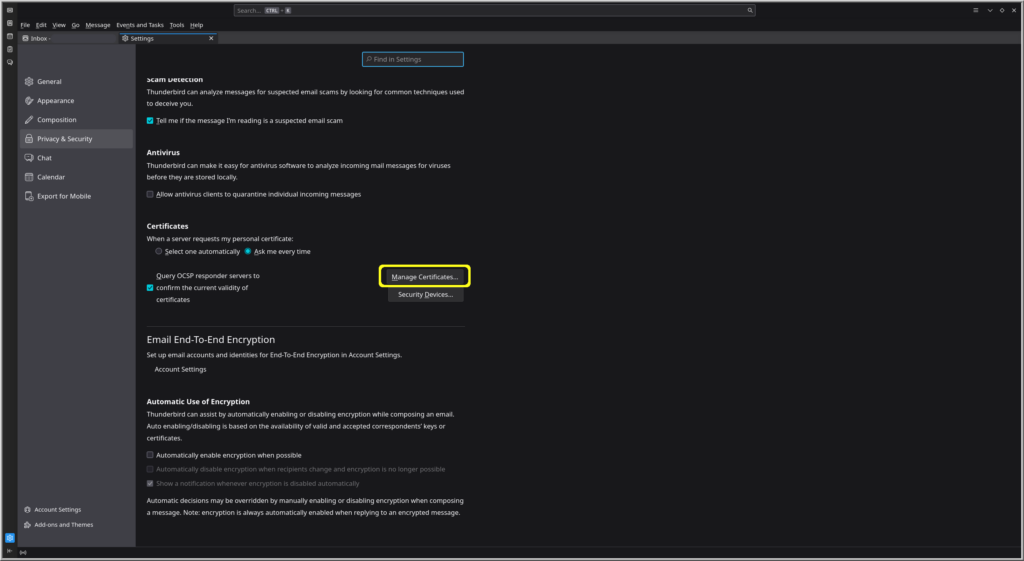
Thunderbird > hamburger / pancakes menu in the upper right corner > Settings > Privacy & Security > Security > Certificates:

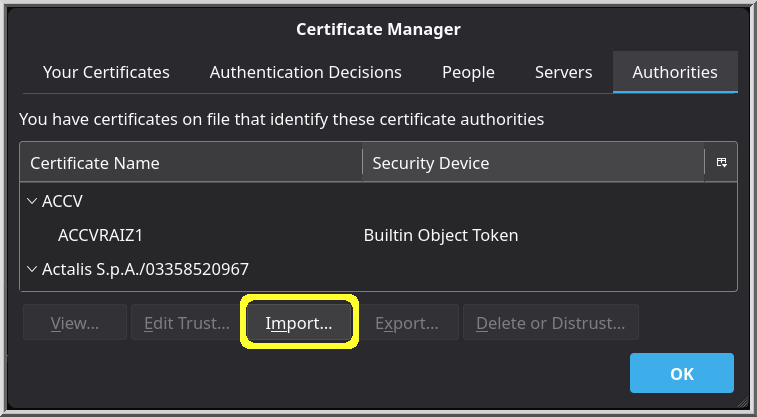
Then, on the Authorities page, choose Import. I had to change the drop-down in the file picker to allow all files, because .ca files aren’t normally something one would (have to) import.

pfSense 24.11 is not good

I had purchased the Netgate 3100 from the company because I thought that would get me the best compatibility and support. Well, an update was made available: 24.11-RELEASE (arm) and I made the mistake of applying it six days ago. My whole router/firewall has crashed thrice since then.

I’ve been pretty unhappy with Netgate for a while now, so a couple of days ago I pulled the trigger on purchasing a Protectli Vault V1210 Mini PC. I’ll install OPNsense on it and duplicate what I have in the Netgate. Then the Netgate 3100 will go to the landfill.

When I bought the Netgate appliance, I didn’t know about the shenanigans the Netgate owners were doing with their staff. I wish I had known that; I would have started with something other than Netgate.

In the Make Orwell Fiction Again category, I remember reading several articles about how the Netgate owners screwed a former employee, and it ended up in lawsuits. Those stories have now been memory holed. Sigh.

Later, I found a definite bug in their SMTP over TLS implementation, in the initialization routine. Mind you, I’ve been doing SMTP for more than twenty years. I know how to do SMTP via telnet, and can do really low-level commands with it. Everyone with that particular version of pfSense would be affected by not being able to do SMTP over TLS to an outside mail server because of this initialization bug.

I wrote up the bug with the steps to duplicate it, and I tried to submit it to Netgate technical support.

Their answer was “You don’t have a current support contract. Buy a support contract, and we’ll work on it.”

I am not paying you to fix your shit. You should be paying me for so clearly identifying where your software fell down.1 The pfSense user interface under System > Advanced > Notifications has a checkbox to Enable SMTP over SSL/TLS. This should work, and it did not. I went through the steps at the command line level, and everything was there and workable. The certificates validated, and email flowed like it should – if I did it manually.

That they wanted me to pay them to fix their broken software is galling.

I do miss the days of Novell, where their published policy was “Yes, you need to pay to open a support ticket, but if this turns out to be our bug and not something you could have fixed on your own by RTFM2, then we will refund you your money.” I think in the twenty years I was a GroupWise admin, almost every support ticket I opened with them ended up being zero cost for us. Once, the support technician said that yes, they had already known about the bug, but the Technical Information Document (TID) was only a day away from being published. Heh. If I’d waited a day, I could have RTFM’d the TID and not bothered with opening a ticket. Yes, he refunded us the support ticket cost. Sure enough, the next day the TID was published, with exactly the same steps the support technician walked me through to solve the problem.

  1. I’m pretty sure it was an extra carriage-return character when calling OpenSSL. ↩︎
  2. The Novell folk were always nice and polite, so in this case it is Friendly manual ↩︎

Let’s Encrypt for my internal domain

It is time to renew my wildcard SSL certificate for an internal domain I have, and here are the steps I went through to solve it. When I say internal domain I’m referring to a DNS domain that exists on the public Internet, but which wholly and only points to the IP address of my home broadband router. That router has pass-through enabled, so that essentially, my pfSense box is my presence on the Internet for everything inside my home.

I turned off HAProxy so that pfSense wouldn’t be sending the challenge traffic to the only internal server I put out there. The internal server, Nextcloud, doesn’t play nice with others; in order to keep things consistent, they want it to be an appliance where the only stuff running on the box is their code. Okay, I get that. This wouldn’t be so annoying if it wasn’t bug-riddled junk that is in a huge rush to implement new features. Can you say “AI”? But I digress.

I created a new Linode API key in case the problem was that the old API key didn’t have access. Well, the first new key had the wrong selector, and resulted in “Your OAuth token is not authorized to use this endpoint”.

The problem is that the pfSense script is trying to generate a challenge key and insert it into a web server that doesn’t exist. The pfSense web admin portal is that web server. When I turned off HAProxy, that should have opened it up. It did, but I couldn’t tell because the Linode API key was wrong.

Okay, maybe I need to log in to the pfSense box and manually use a generated challenge key? How to log in to the pfSense box? When was the last time I did that?

Here’s a convenient command:

 history | awk '{$1="";print substr($0,2)}' | grep "ssh " | grep -v history | sort | uniq

We run the output of the history command through awk to remove line numbers, then search for "ssh " (the trailing space omits ssh-copy-id and such), run that through sort, and run that through uniq. Et voilà, and I have a list of all twelve boxes I’ve logged in to since history.

Sigh: pfSense isn’t one of them.

But this was a good exercise: I did get logged into pfSense, and did find the “Your OAuth token is not authorized to use this endpoint” problem.

I deleted the previous Linode v4 API certificate specifications, and it worked.

Time to turn HAProxy back on.

Okay, the short form is:

  1. Generated a new Linode API access token with Domain read/write access
    • This probably won’t be required if the access token hasn’t expired.
  2. pfSense > Services > HAProxy > Settings > disable and apply
  3. pfSense > Services > Acme > Certificates > pick certificate and Edit > delete the Domain SAN list entry > Add a new Domain SAN list entry with the new Linode API access token > Save
  4. pfSense > Services > Acme > Certificates > pick certificate and hit Renew
  5. Do the other certificate in the list
  6. pfSense > Services > HAProxy > Settings > Enable and apply